The Small Business Marketing Stack: What You Actually Need (And What You Can Skip)
You don't need a marketing department — or 12 platforms. Here's the short list that actually moves the needle.
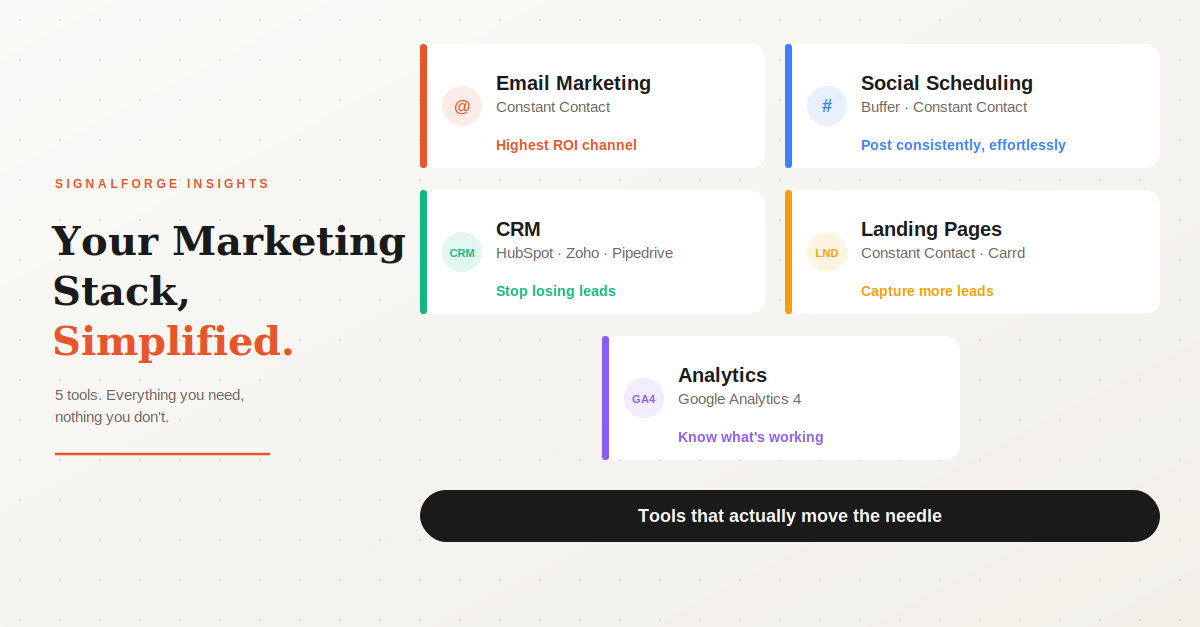
Most small business owners we talk to are doing their marketing in one of two ways.
Either they're doing everything manually — posting when they remember, sending one-off emails, hoping word of mouth carries them — or they've signed up for too many tools, none of which are actually connected, and the whole thing feels like more work than it's worth.
Sound familiar? You're not alone.
Here's the good news: an effective marketing setup for a small business doesn't need to be complicated or expensive. You don't need 12 platforms. You don't need a full-time marketing person. You need a small stack of tools that work well together — and a basic system for using them consistently.
This guide breaks down exactly what that looks like and how to get started.
Start Here: What Does "Effective Marketing" Actually Mean?
Before we talk tools, let's get clear on what you're trying to accomplish. For most small businesses, effective marketing comes down to three things:
- Getting found by people who don't know you yet (awareness)
- Staying top of mind with people who do know you (engagement)
- Turning interested people into paying customers (conversion)
Every tool in your stack should serve at least one of those three goals. If it doesn't, you probably don't need it.
The Core Stack: 5 Tools That Cover Everything
Email Marketing Platform
If you're only going to invest in one marketing tool, make it this one. Email is still the highest-ROI marketing channel available — research consistently shows $36 to $42 returned for every $1 spent when done well.
What it does: Lets you build a list of customers and prospects, send regular updates, promotions, and newsletters, and automate follow-up sequences so you're not doing everything manually.
What to look for: Easy drag-and-drop email builder, basic automation (welcome sequences, follow-ups), list management, and reporting on opens and clicks. Bonus if it also handles SMS and social posting so you're managing fewer tools overall.
Constant Contact. It's what we run our own campaigns on and what we set up for our clients. It handles email, SMS, and social posting from one dashboard, which keeps things simple.
Other options: Mailchimp (free up to 500 contacts, good for getting started), Klaviyo (excellent for ecommerce), Brevo (strong automation at a lower price point).
Social Media Scheduling Tool
Posting consistently on social media is one of the biggest challenges small businesses face — not because the content is hard, but because life gets in the way. A scheduling tool lets you batch your content in one sitting and have it go out automatically throughout the week.
What it does: Lets you write and schedule posts across Facebook, Instagram, LinkedIn, and other platforms from one place, often with a content calendar view so you can see what's going out when.
Quick note on Constant Contact: If you're already using it for email, social scheduling for Facebook, Instagram, and LinkedIn is built in. For most small businesses that's all you need — and it keeps your tool count down.
If you need more: Buffer is our go-to recommendation for dedicated social scheduling. It's clean, simple, and connects to all the major platforms.
A Simple CRM
You don't need Salesforce. You don't need anything that requires a week of training to set up. But you do need somewhere to keep track of your leads, customers, and follow-ups — because if that's all living in your head or scattered across your inbox, you're losing business without knowing it.
What it does: Keeps a running record of every contact you're working with, where they are in the buying process, and what your next action is. The simple act of having this written down somewhere you actually check will close more deals.
Good options to consider: HubSpot CRM (genuinely free for the basics, no time limit), Zoho CRM (free up to 3 users), or Pipedrive (very clean and sales-focused).
A Landing Page or Lead Capture Tool
Most small business websites are not set up to convert visitors into contacts — there's no clear offer, no easy way to sign up, no reason to leave an email address. A landing page tool fixes this.
What it does: Creates a focused single page with one clear call to action — a free consultation, a discount, an event registration — connected directly to your email list so new signups go straight into your marketing.
What works well: Constant Contact includes landing pages. If you need something more flexible, Carrd is excellent for simple, clean pages.
Analytics: Know What's Actually Working
You don't need to become a data analyst. But you do need to look at your numbers once a week — even for 10 minutes — so you're making decisions based on what's actually working rather than what feels right.
What to use: Google Analytics 4 is free and connects to your website in about 10 minutes. Your email platform shows open rates, click rates, and unsubscribes after every send. Your social tool shows engagement by post. Between those three you have everything you need.
Putting It All Together: What This Actually Costs
These are the vendors' own published prices — what you'd pay going directly to each tool. No markups, no surprises.
That's less than a single boosted Facebook post — and it runs your entire marketing operation.
What You Can Skip (For Now)
A few things small businesses often feel pressure to invest in early that can wait:
- Expensive all-in-one platforms like HubSpot paid tiers or Pardot — built for companies with dedicated marketing teams, overkill at this stage.
- SEO tools — useful eventually, but get your email list and social presence working first.
- A new website — if your current site is functional and loads on mobile, that's enough to start.
- Professional video production — short authentic videos shot on your phone outperform polished productions on social media right now. Don't let "I don't have a real camera" stop you.
The Honest Truth About Marketing Tools
The best stack in the world doesn't do anything sitting idle. The businesses that see results are the ones that use these tools consistently — sending emails on a regular schedule, posting to social two or three times a week, following up with leads in their CRM.
The tools make it easier to be consistent. But they don't replace the habit of showing up.
Not sure where to start?
If you'd like help setting this up properly the first time — practical, affordable, and built around tools you'll actually use — that's exactly what we do at SignalForge.
Book a free 30-minute strategy call